Showing posts with label Java. Show all posts

Thursday, June 25, 2026

Always compare objects (including Integer and Long etc) with equals

 The difference between equals() and == in Java is known to everyone. There is a minute detail, though, which I will explain a moment later.

Consider the situation:

Map<String, Integer> map = new HashMap<>();
map.put("a",128);
map.put("b",128);

map.put("c",1100);
map.put("d",1100);

map.put("e",5);
map.put("f",5);

System.out.println(map.get("a") == map.get("b"));
System.out.println(map.get("c") == map.get("d"));
System.out.println(map.get("e") == map.get("f"));

The first two return false, while the third one returns true.
This means that if you depend on ==  for equality comparison of two wrapper objects, your code can silently fail.

Why do you need to compare?
Various reasons based on your requirement. One common reason could be using them in a Comparator. Whatever be the reason, using == can fail you and your code.

Why does it fails? 
JVM caches primitives to some extent. For example, int and long values -128 to 127 are cached. The range is decided by the writers of JLS (Java Language Specification) to improve performance by avoiding repeated creation and garbage collection of objects for common use cases such as loops, basic counts or array indexing. Similarly, the booleans true and false are cached too.

When you use java.lang.Integer, or do boxing such as in the map values above, new Object is created which resides on the heap. Comparing them means comparing object. If the value falls within the cached values, JVM object simply references or points to the cache object.
So when you have Integer a = 128; JVM creates a new Object on the heap. When you have Integer b = 120, JVM find the value in the cache and just points to that, preventing a new Object to be managed.
When you use primitives, int a = 128, this is just a member of the thread stack or sits inside the object of the class where its defined. 

Now see below:
Integer a = 130, b = 130;
System.out.println(a==b); // false
System.out.println(a==130); // true

First one gives false since objects are compared, and both are different by virtue of their hashcodes even if their content is same.
Second line gives true because upon seeing the ==, JVM just unboxes the "a" to primitive 130 and quickly compares.

An actual code:

Map<String, Integer> map = new HashMap<>();
map.put("a", 130);
map.put("b", 120);
map.put("c", 130);
map.put("e", 140);
map.put("f", 150);

        List<String> sortedList = new ArrayList<>();
sortedList.addAll(map.keySet());
Comparator<Integer> comparator = (str1, str2) -> {
// reverse sort on same values
if(map.get(str1) == map.get(str2)) {
return str2.compareTo(str1);
}
// normal sort on different values
return Integer.compare(map.get(str1), map.get(str2));
};
        Collections.sort(sortedList, comparator);

The expectation is that the list should be sorted based on the below conditions:
1. If count is the same for multiple strings, sort them in reverse order
2. If the counts of two strings are not same, sort them in a normal ascending or lexicographical order.

Our expected output should be : [b, c, a, e, f].
Notice how "a" and "c" are in reverse order.

But if you run the above code, you will get: [b, a, c, e, f].
"a" and "c" never were reverse sorted because the == actually compared two different objects with different hash code, ensuring our goal was not met. 
Were we having some other strings with the same count within the cache-able range, i.e. -128 to 127, this == would have worked flawlessly.
This means our code is now flaky with == comparison of two Objects. Only way it will work as expected is to use equals():

            if(map.get(str1).equals(map.get(str2))) {
return str2.compareTo(str1);
}
On paper and IDE, == looked safe until it silently failed.

Conclusion:
The most important thing to remember is not to depend on things that confuse or feel flaky, strictly use whats advised: == for primitives and .equals for objects (wrapper classes like Integer, Long are objects after all).

Sunday, April 10, 2016

IP v4 address matcher (regex)

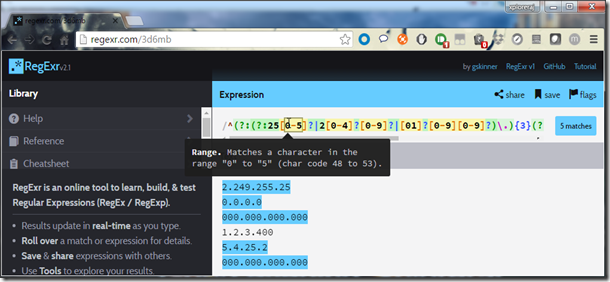
IP address is a string in the form "A.B.C.D", where the value of A, B, C, and D may range from 0 to 255. Leading zeros are allowed. The length of A, B, C, or D can't be greater than 3.

image
The pattern is: ^(?:(?:25[0-5]?|2[0-4]?[0-9]?|[01]?[0-9][0-9]?)\.){3}(?:25[0-5]?|2[0-4]?[0-9]?|[01]?[0-9][0-9]?)$

Java:
public class IPv4Regex {
	static final String ipV4Pattern = "^(?:(?:25[0-5]?|2[0-4]?[0-9]?|[01]?[0-9][0-9]?)\\.){3}"
			+ "(?:25[0-5]?|2[0-4]?[0-9]?|[01]?[0-9][0-9]?)$";
	
	public static void main(String[] args) {
		System.out.println("000.123.234.245".matches(ipV4Pattern));
	}
}

Friday, February 12, 2016

Designing your own iterable stuff

Or, simply, implementing iterator logic in your own class, on which you can iterate or even use for-each loop. Because, for-each works only on Iterator based collections.
Following is a generic Java 7 code that takes into account a simple custom linked list implementation that is generic and can be iterated over, using following steps.
1. The stuff we want to iterate upon has to be Iterable and expose
iterator()
2. Design a java.util.Iterator by overriding hasNext(), next() and remove().

Sunday, June 28, 2015

Sorting Key-Value pairs in Java

Saw making your own sorting logic by implementing Comparable or Comparator? If not, click here. Now, how about sorting key-value pairs! Well, we need just a little code modification. See following code sample that sorts key-value pairs, first by key, then values. Look at the compareTo method implementation.

Sunday, June 7, 2015

Comparable and Comparator- When and how to use? [Concise]

When there comes the need of sorting objects, be it using Collections.sort() or just adding elements to Treeset etc, java.lang.Comparable and java.util.Comparator come into picture. For default sorting of objects in the collection, we need to implement Comparable and override below method in that class, unless we are using some pre-defined class that already implements Comparable like String, Integer etc.,
int compareTo(T o)
If we want to provide an external sorting logic to override the default one, the class needs to implement Comparator interface and override the following method:
int compare(T o1, T o2)
The question: Why use Comparator when we already have Comparable?
Answer: If you have authored that class, then you can give a default sorting behavior by implementing Comparable and use that logic to sort whenever needed. Now, let's say that you are using an existing class whose source you can not modify and the default sorting logic of which you are not satisfied with. What now? Just write a Comparator using your own sorting process and use that instance to sort. See below sample programs.

The API information is here:
1. java.lang.Comparable
2. Java.util.Comparator
Lets dig into this with our custom class.

Thursday, January 29, 2015

native2ascii - Native-to-ASCII Converter in Java

This utility converts a file with characters in any supported character encoding to one with ASCII and/or Unicode escapes, or visa versa.

You already have this tool if you have JDK. It is present in your JDK installation bin folder. Its recommended to add JAVA_HOME to your PATH environment variable for access of java tools throughout your machine.

Saturday, December 20, 2014

Falling in love with InteliJ Idea Community IDE

The local file history that keeps a track on my changes to a file, I am all smiles now! :~)

Local History - Click on the image to enlarge

Tuesday, May 20, 2014

Java Map/Collections Cheat Sheet : Simply 'When and What to use'?

This is a notoriously simple when and what to use Java collection API cheat sheet, containing most common implementations.

Monday, May 19, 2014

Find the occurrence of words in a given string

IDEONE: http://ideone.com/9SENHc
package com.learning.collection;
import java.util.*;
/**
 * Count frequency of words occurring in a string
 */
public class MapExample {
    public static void main(String[] args){
        String str = "ika pika ting tong ting tong me";
        String[] strr = str.split("\\s");
        workMap(strr);
    }

    static void workMap(String...words){
        Map map = new HashMap();
        Integer ONE = new Integer(1);

        for(String word : words){
            Integer frequency = (Integer)map.get(word);
            /*
            'frequency' is the count of the words.
            For a new word getting added to the Map, we set its frequency as 1.
            For existing words, we take their existing frequency (value in the map)
            and increment it and put back into the map correspondint to that word (key in the map)
             */
            frequency = (frequency == null) ? ONE : new Integer(frequency.intValue() + 1);
            map.put(word, frequency);
        }
        System.out.println("Unsorted:");
        System.out.println(map);

        Map sortedMap = new TreeMap(map);
        System.out.println("Sorted:");
        System.out.println(sortedMap);
    }
}
Output:
Unsorted: {ika=1, pika=1, ting=2, tong=2, me=1}
Sorted: {ika=1, me=1, pika=1, ting=2, tong=2}


--Suggestion by Dr. Heinz Kabutz (Java Champion)
How you would count words in Java 8 :-) And if you want to do it in parallel, just add parallel() into the stream...
import java.util.*;
import java.util.function.*;
import java.util.stream.*;

public class MapExample {
  public static void main(String[] args) {
    String str = "hello world how are you how is life i am into ascent";

    Map<String, Integer> map = Arrays.stream(str.split("\\s"))
        .collect(Collectors.toMap(
            Function.identity(),
            n -> 1,
            (n1, n2) -> n1 + n2,
            TreeMap::new));
    System.out.println("map = " + map);
  }
}

Thursday, April 24, 2014

Synchronization in Java : class and object locking concept

People talk about two types of multi-threaded locking - object and class. In my knowledge, locking is done on objects only. Let me explain.

Case 1: On objects we create using new or factory methods etc.
void synchronized myMethod(Type param) {
  //will lock on the instance used to call this method
}
or
synchronized(this) {
 //will lock on current object
}
or
synchronized(obj1) {
 //will lock on specified obj1 object
}

Monday, April 21, 2014

Writing singleton classes in Java

Singleton classes are those classes which can be instantiated only once. We need to restrict the creation of multiple instances of that class by blocking constructor access using new keyword etc, and instead regulate the incoming instance requests by creating the instance only once and return the same instance time and again on multiple calls.
Where do we actually need this singleton design pattern?

Friday, April 11, 2014

Bubble Sorting in Java

Bubble sorting sorts the array in-place bubbling up the largest value.
Complexity:
Worst case - O(n^2); average case - O(n^2); best case - O(n)

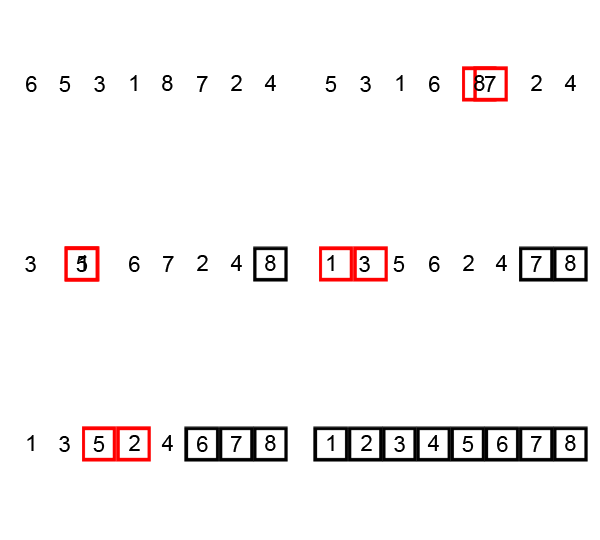
Visualization: (src. Wiki)

Thursday, March 20, 2014

Fibonacci Series in Java


Q. Print Fibonacci series in Java.
0, 1, 1, 2, 3, 5, 8, 13, 21, 34, 55
public class FibonacciSeries {
  
 public static void main(String[] args) {
  int sum = 0;
  //how many numbers to print
  for(int i=0, j=1; i<=10; i++){
   if(i==0){
    //for printing first number which is 0
    System.out.print(0 + ", ");
   }
   else{
    //j has last 'sum', and sum now stores latest added value
    //while the control enters again, j gets latest 'sum' value before
    //new sum is calculated and printed again
    sum = j + (j=sum);
    System.out.print(sum + ", ");
   }
  }
 }
}

Thursday, January 30, 2014

Matrix Multiplication in Java


package com.learning.ds.matrices;
import com.learning.ds.arrays.ArrayUtil;

/**
 * Created by Rajdeep on 28/1/14.
 */
public class MatrixMultiplicationDemo {
    public static void main(String[] args){
        //the temp1 and temp2 array values can be changed to test this program
        int[][] temp1 = {{2,0}};
        int[][] temp2 = {{1,1,1}, {2,2,2}};

        System.out.println("Matrix 1: ");
        ArrayUtil.print2DIntArray(temp1);
        System.out.println("Matrix 2: ");
        ArrayUtil.print2DIntArray(temp2);

        if( !( isFilledMatrix(temp1) && isFilledMatrix(temp2) ) ){
            System.out.println("One of the matrices is not filled completely and can't be used for multiplication.");
        }
        else{
            //check dimension
            if(!areMatricesMultipliable(temp1, temp2)){
                System.out.println("The number of columns in first matrix is unequal to number of rows in second matrix. The must be equal for dot product.");
            }
            else{
                System.out.println("can be multiplied");
                int[][] tempNew = multiplyMatrices(temp1, temp2);
                System.out.println("new matrix is: ");
                ArrayUtil.print2DIntArray(tempNew);
            }
        }
    }

    private static int[][] multiplyMatrices(int[][] temp1, int[][] temp2) {
        //
        int rowCount1 = temp1.length;
        int colCount1 = temp1[0].length;
        int colCount2 = temp2[0].length;

        int[][] tempNew = new int[rowCount1][colCount2];

        for(int i=0; i < rowCount1; i++){
            int k=0;
            while(k < colCount2){
                int tempVal = 0;
                for (int j=0; j < colCount1; j++){
                    tempVal = tempVal + ( temp1[i][j] * temp2[j][k] );
                }
                tempNew[i][k] = tempVal;
                k++;
            }

        }

        return tempNew;
    }

    //matrix multiplication rule is
    //no of columns of left matrix == no of rows in right matrix
    // (m x n) . (n x p) = (m x p)
    private static boolean areMatricesMultipliable(int[][] mat1, int[][] mat2){
        return (mat1[0].length == mat2.length);
    }

    //check the matrix has all elements filled or not
    //In other words, checking whether number of columns in each row is same
    private static boolean isFilledMatrix(int[][] mat){
        boolean retVal = false;
        int rows = mat.length;
        
        if(rows == 1){
            retVal = true;
        }
        else {
            for(int i=0; i < (rows-1); i++){
                if(mat[i].length != mat[i+1].length){
                    retVal = false;
                    break;
                }
                else
                    retVal = true;
            }
        }

        return retVal;
    }
}


The
ArrayUtil.print2DArray(int[][] args)
prints the array on screen through normal 'for' loops.
One sample output:
Matrix 1:
2 0
Matrix 2:
1 1 1
2 2 2
can be multiplied
new matrix is:
2 2 2
Another sample output by changing the temp1 and temp2 arrays in main() method:
Matrix 1::
2 0 3:
Matrix 2::
1 1 1:
2 2 2:
One of the matrices is not filled completely and can't be used for multiplication.

Monday, January 27, 2014

Matrix Operation in Java: Addition of two 2x2 matrices demonstrated


For addition or subtraction, the dimensions of the matrices must be same. This is just a demonstration code and can be rewritten in a far more optimized manner.
package com.learning.ds.matrices;

/**
 * Created by Rajdeep on 27/1/14.
 */
public class MatrixAdditionDemo {
    public static void main(String[] args){
        int[][] arr1 = {{1,2,3},{4,2,6}};
        int[][] arr2 = {{10,20,30},{40,50,60}};

        System.out.println("Matrix A:");
        for(int i=0; i < arr1.length; i++){
            for(int j=0; j < arr1[i].length; j++){
                System.out.print(arr1[i][j] + " ");
            }
            System.out.println();
        }

        System.out.println("Matrix B:");
        for(int i=0; i < arr2.length; i++){
            for(int j=0; j < arr2[i].length; j++){
                System.out.print(arr2[i][j] + " ");
            }
            System.out.println();
        }

        System.out.println("Addition of A and B:");
        int[][] tempArr = addMatrices(arr1,arr2);
        if(tempArr!=null){
            for(int i=0; i < tempArr.length; i++){
                for(int j=0; j < tempArr[i].length; j++){
                    System.out.print(tempArr[i][j] + " ");
                }
                System.out.println();
            }
        }

    }

    //add the matrices
    private static int[][] addMatrices(int[][] m1, int[][] m2){
        //check size
        if(!ofSameSize(m1, m2)){
            System.out.println("[Error] The matrices' dimension in operation do not match!");
            return null;
        }
        int len1 = m1.length;
        int[][] tempArr = new int[2][3];
        for(int i=0; i < tempArr.length; i++){
            for(int j=0; j < tempArr[i].length; j++){
                tempArr[i][j] = m1[i][j] + m2[i][j];
            }
        }
        return tempArr;
    }

    //for adding, the size must be same
    private static boolean ofSameSize(int[][] m1, int[][] m2) {
        int len1 = m1.length;
        int len2 = m2.length;
        boolean check = true;
        if(len1==len2 & len1!=0){
            //System.out.println("length is: " + len1 + " and " + len2);
            for(int i=0; i < len1; i++){
                if(!(m1[i].length == m2[i].length)){
                    check = false;
                }
            }
        }
        else
            check = false;

        return check;
    }
}

Sample output 1:
Matrix A:
1 2 3
4 2 6
Matrix B:
10 20 30
Addition of A and B:
[Error] The matrices' dimension in operation do not match!

Sample output 2:
Matrix A:
1 2 3
4 2 0 
 
Matrix B:
10 20 30
11 5 3 
 
Addition of A and B:
11 22 33
15 7 3 

Quick Sort Demo


This is a divide and conquer approach. Take a pivot as the last element of array, and place all numbers lesser than this to the left. This is done using partitioning as seen in the code.
Complexity:
Best - O(n logn); Average - O(n logn); Worst - O(n^2)

Monday, December 30, 2013

Insertion Sorting Logic

Insertion sort iterates, consuming one input element each repetition, and growing a sorted output list. Each iteration, insertion sort removes one element from the input data, finds the location it belongs within the sorted list, and inserts it there. It repeats until no input elements remain. -Wiki

Monday, December 16, 2013

LinkedList: Node creation and display example


package ds;

/**
 * @author Rajdeep
 * 
 * Note
 * Creating the list:
 * 1. 'start' refers to the first node and 'now' is made to refer to the latest
 *   added node.
 * 2. after creating the first linkedlist object and assigning value,
 *   'start' points to it because we are checking for start==null
 *   'start' is null in first node addition only.
 *   'now' also points to it, this being the latest node.
 * 3. Second node onwards, start is never null, so control goes to else part.
 *   'now.next' points to nothing because its of reference type.
 *   so assign 'now.next' to the newly created object after
 *   checking 'now.next==null'.
 * 4. Now 'start' pointed or the first object's (node's) 'next' part is linked
 *   to the 2nd object since now was referring to it, and then after
 *   'while' execution, 'now' points to the newly created node, referred by
 *   the local 'temp' variable.
 * 5. e.g.: start -> [10|add1] at add0 -> [20|add2] at add1 -> [30|NULL] at add2;
 *   'now' points to this add2 having info 30, and 'now.next' is NULL,
 *   so that when another node is created, 'now.next' refers to the new
 *   node, and then 'now' refers to the new node, and so on.
 * 
 * Displaying the list:
 * We start from the starting node, and display 'info' part of each node, and
 * move on to next node by checking the current node's 'next' part is not null.
 */

// This is the Linked List node
class LinkedList{
 int info;   //has value
 LinkedList next; //for pointing to next node
}

// Demonstration on creation of node and displaying the values
public class LinkedListDemo {

 static LinkedList start = null;
 static LinkedList now = null;
 
 public static void main(String[] args) {
  createNode(0);
  createNode(1);
  createNode(5);
  createNode(7);
  createNode(10);
  createNode(11);
  createNode(54);
  createNode(76);
  
  display();
 }
 
 static void createNode(int val){
  LinkedList temp = new LinkedList();
  
  temp.info = val;
  if (start==null){
   start = temp;
   now = temp;
  }
  else{
   while(now.next==null){
    now.next=temp; 
   }
   now = temp;
  }
 }
 
 static void display(){
  LinkedList temp = start;
  System.out.print("[");
  while(temp!=null){
   System.out.print(temp.info + "|");
   temp = temp.next;
  }
  System.out.println("\b]");
 }

}
The output will be:
[0|1|5|7|10|11|54|76]
This was a demo program for my understanding, and now I understand how the nodes are connected, and so the term "linked list".

Tuesday, October 1, 2013

The try-catch-finally love affair!

Ok, everybody here already know about the affair, I am just discussing some more bits of this love triangle.
Lets dig hard to the shallow level :)

try{
    //try something
}
//and if the trial goes wrong, catch the issue and handle
catch(Exception e){
    //handling the problematic part
    //or at least letting the program to continue
    //and exit gracefully and not shut at face!
}
//but
finally{
    //do this, so you are the winner!!
}

So from even the baddest of our common-sense, we smell that finally block supercedes the two others, viz., try and catch. Lets prove a point in this.

Tuesday, August 13, 2013

How many objects are created when you create an object of a plain class?

This is shared out of a random thought. Let’s say we’ve got two classes:
class A{}
class B extends A{
 static B obj = new B();
}
Do not read further until you have the answer to the question.